
O.L
O.L refers to camera, celluloid or cut transitions where one image gradually overlaps or fades into another. It is commonly used to signal a passage of time, change of scene, or create a smooth emotional flow between cuts. Unlike hard transition between cuts, O.L creates continuity through gradual blending.
In Japanese animation, O.L is a standard notation for photographic effects applied during compositing. Instead of abruptly cutting from Cut A to Cut B, the images overlap: Cut A fades out while Cut B fades in. The transition length (number of frames) defines how smooth or sharp the effect feels.
Different terms may appear depending on production notes:
- O.L (Overlap) → general fade overlap between cuts.
- Dissolve → gradual blending, often soft and cinematic.
- Transition → broader category, may include wipes or directional fades.
- Cross Fade → direct fade-out of one image into fade-in of another.
These effects are usually handled in the photography/compositing stage, but animators must specify them clearly so timing stays consistent with the storyboards.
Timesheet
On the timesheet, O.L is written in the camera instruction column, often at the border between two cuts.
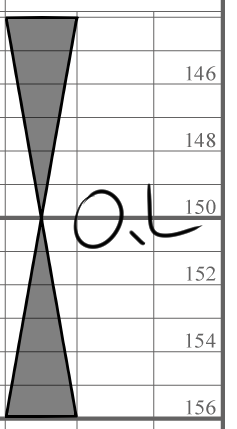
A transition method where one cut fades out while the next cut fades in, overlapping for a smooth change.
On the timesheet, note the O.L. duration clearly up to the margin where the overlap ends.
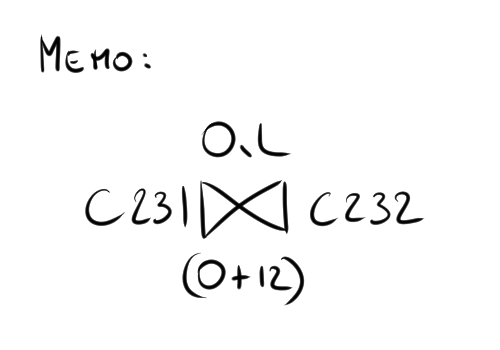
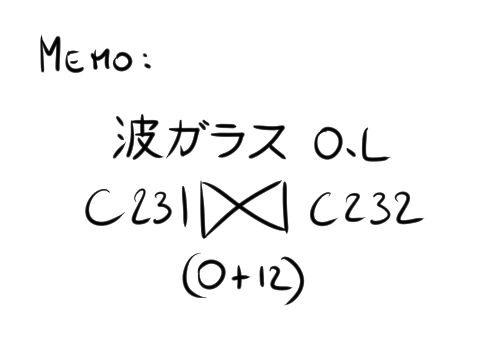
Always write the O.L. scale. For example, 0 + 12 means 0 seconds and 12 frames.
If you also note the cut number of the overlapping cut, it makes it easier to follow.
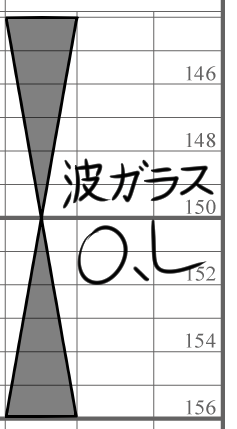
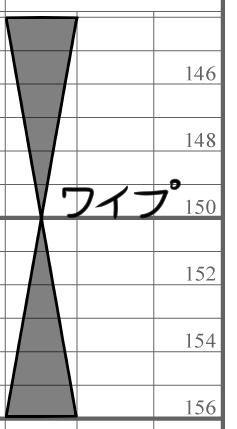
Wave Glass O.L (波ガラス O.L)
Overlay using the Wave Glass method.
On the timesheet, make sure to write the O.L. information only up to the margin line.
WIPE (ワイプ)
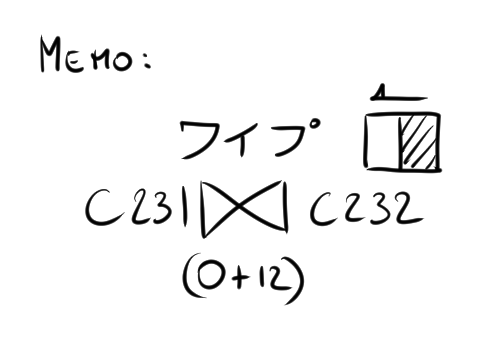
A wipe is a way to switch from one cut to another using different mask shapes.
On the timesheet, write it down up to the margin section of the wipe.
If the wipe uses a special shape, extra materials will be needed.
Be sure to specify the type (shape) and direction of the wipe in the memo.
Example
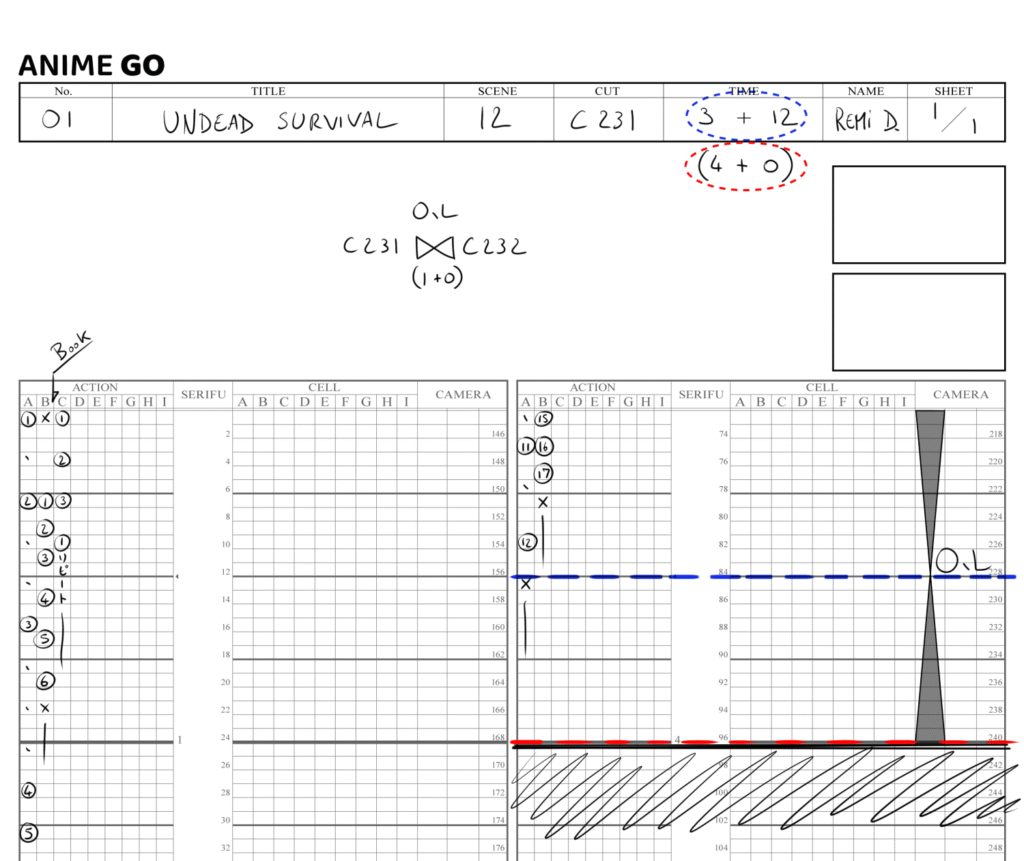
Depending on the studio, you may be asked to write the length including the overlap in this field, so make sure to check in advance.
In the example, 3 + 12 (shown with the blue dotted outline) indicates the length up to the center of the overlap. Note that using this value for calculations can cause errors when measuring the total length, please be aware of that.
On the other hand, writing the full length 4 + 0 (shown with the red dotted outline), which includes the overlap, makes mistakes less likely.
For the animation to flow smoothly, both the timesheet and the animation itself should match the full duration with the overlap included (red dotted line).
Additional notes may specify the intensity of the fade (linear, ease-in, etc.) or whether it applies to characters, background, or both.
Timechart
The timechart does not require any notation for this effect, since it is fully managed in the timesheet.
Conclusion
O.L is a fundamental cinematic tool in Japanese animation, allowing smooth and expressive transitions between cuts. By specifying duration and type on both the timesheet and timechart, animators ensure the compositing team can execute fades and dissolves precisely as intended.