
Iris In・Iris Out
Iris In and Iris Out are camera transitions where the image is revealed or hidden through a shrinking or expanding shape, usually a circle. For the Iris In, the image appears from a small shape and expands to full screen. Iris Out, the image closes into a small shape, hiding the scene. They are often used to focus attention, emphasize a moment, or create a stylized transition.
An Iris transition does not fade the image using transparency like Fade In / Fade Out.
Instead, it uses a mask that changes size over time.
Key points:
- The transition is based on shape animation, not opacity
- The most common shape is a circle, but other shapes are possible
- The image itself does not change brightness
- Only the visible area changes
Important distinction:
- Iris ≠ Fade
- Iris ≠ Overlap (OL)
An Iris transition reveals or hides a single cut, not a blend between two cuts.
Timesheet
In the timesheet, Iris In and Iris Out are written as camera instructions, not animation actions.
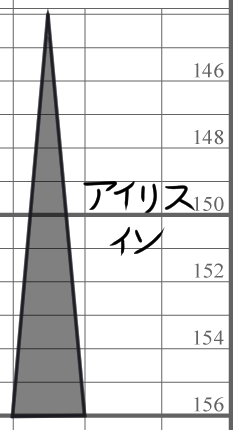
Like the F.I or F.O, the triangle is used here. The orientation of the triangle defines the transition.
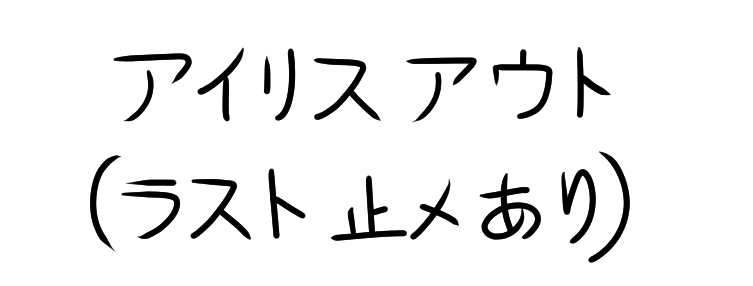
If the Iris Out stops before fully closing, write it as shown in the next image for clarity.
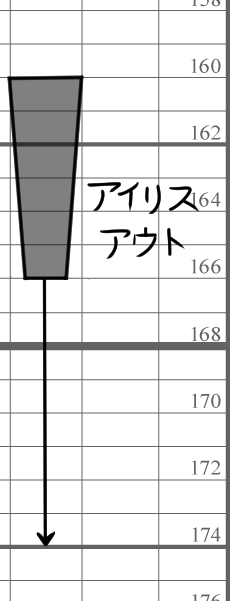
If the Iris Out does not fully close and holds on the last frame, this must be clearly indicated in the Memo column.
Timechart
In the timechart, an Iris transition is represented as a gradual change of the mask size.
Conceptually:
- Iris In: small → large
- Iris Out: large → small
This instruction indicates the exact position where the Iris In or Iris Out stops within the cut’s layout. It specifies the center point of the iris at its final frame, ensuring that all departments clearly understand the intended framing.
Instruction: Indicate where the center point of the Iris In or Iris Out is located within the cut’s layout.
When the iris stops at an arbitrary or non-centered position, this must be explicitly specified to avoid misinterpretation.
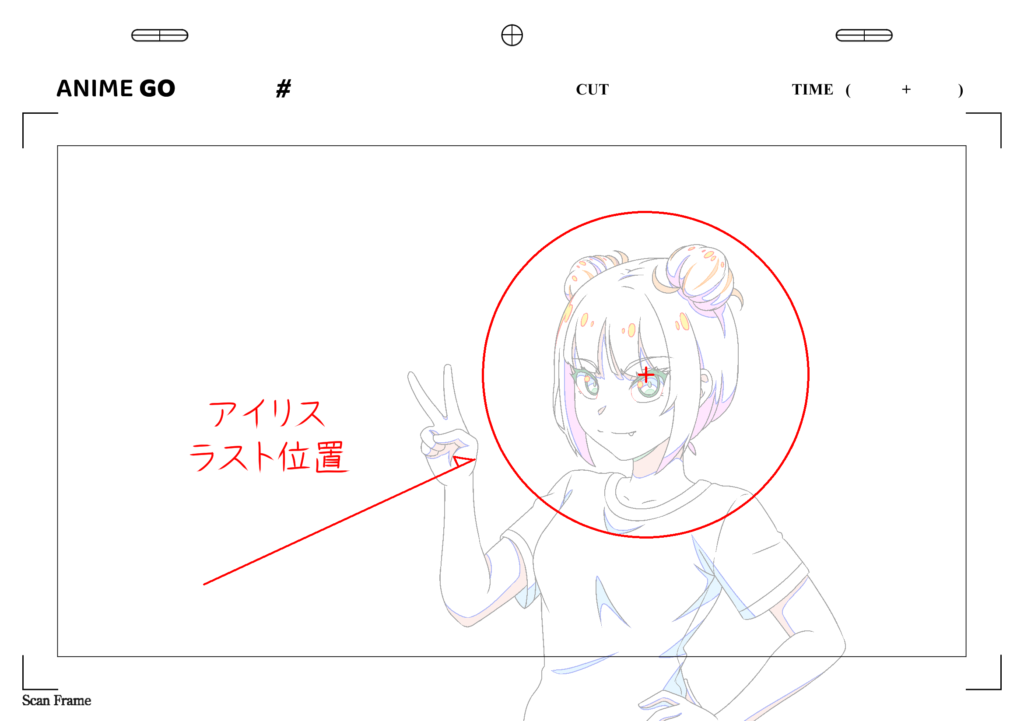
This affects camera processing, not character animation timing.
Conclusion
Iris In and Iris Out are stylized camera transitions based on a moving mask, not on fading or overlapping images.
They:
- Emphasize focus
- Create visual punctuation
- Operate independently from animation drawings
Understanding that an Iris controls visibility through shape, rather than opacity or cut blending, is the key to using it correctly.