
White In・White Out
W.I (White In) and W.O (White Out) are camera effects used to gradually bring a cell or a cut in from white or fade it out to white. They are commonly used to open or close a scene, indicate a passage of time, or create a calm, emotional transition.
In Japanese animation, W.I and W.O are photographic effects handled during the shooting and compositing stage.
Instead of cutting abruptly, the image opacity changes progressively over a defined number of frames. The duration of the fade strongly affects the mood: a short fade feels sharp and functional, while a longer one feels softer and more emotional.
W.I usually starts from a fully white screen and increases opacity until the image reaches 100%.
W.O works in the opposite direction, gradually reducing opacity until the image disappears into white.
Because these effects affect the final timing of a cut, they must be clearly specified by the animator.
Timesheet
On the timesheet, W.I and W.O are written in the camera instruction column.
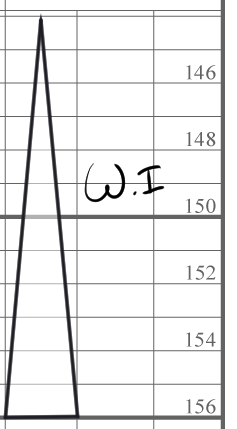
A transition method used to fade a cut smoothly to or from white.
On the timesheet, W.I or W.O is indicated using a triangular symbol. The orientation of the triangle defines the transition: upward for White In, downward for White Out.
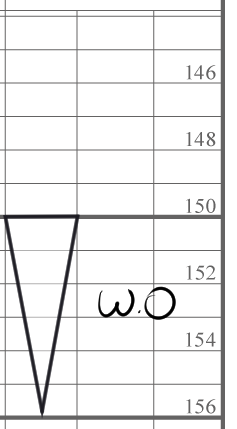
The notation is usually written up to the margin line to clearly define where the fade starts and ends.
If the fade affects the entire cut, it should be aligned with the cut length to avoid timing mistakes during compositing.
Timechart
The timechart does not require any notation for this effect, since it is fully managed in the timesheet.
Conclusion
W.I and W.O are simple but essential tools in Japanese animation. When clearly written on the timesheet, they ensure smooth scene transitions and prevent timing errors during shooting and compositing.
Unlike O.L (Overlap), White In and White Out always involve a transition to or from white, not necessarily between two cuts.
Fade In / Fade Out work the same way as W.I / W.O, but use black instead of white.